
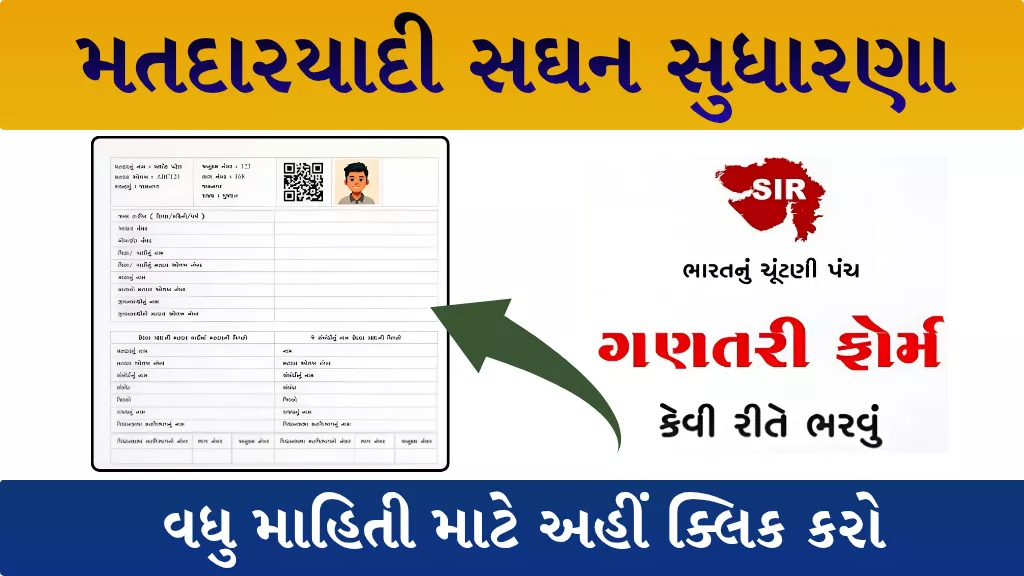
The State-wide Special Intensive Revision (SIR) of the electoral roll is currently being conducted across Gujarat under the guidance of the Election Commission of India (ECI). During this important voter registration campaign, Booth Level Officers (BLOs) are visiting every household to distribute and collect the Enumeration Form — a crucial document that ensures every eligible citizen is correctly listed in the voter list.
In this article, we’ll explain the step-by-step process to fill the SIR Election Commission Counting Form 2025 online, along with details about the required information, document verification, and declaration process.
What Is the SIR Election Commission Counting Form?
The SIR (Special Intensive Revision) form is designed to verify and update voter details during the annual voter list revision. It helps identify:
- New eligible voters,
- Corrections in existing voter information, and
- Deletions of duplicate or incorrect entries.
Every voter or family representative must fill out this form accurately to ensure proper inclusion in the electoral roll.
Mandatory Details to Fill in the SIR Form 2025
When filling out the SIR enumeration form, make sure to enter the following details correctly:
- Date of Birth (DD/MM/YYYY)
- Aadhaar Number (optional but recommended)
- Mobile Number
- Father’s or Guardian’s Name
- Voter ID Number of Father/Guardian (if available)
- Mother’s Name
- Mother’s Voter ID Number (if available)
- Spouse’s Name (if applicable)
- Spouse’s Voter ID Number (if available)
Details and Importance of Signature
In the form, voters must also fill out details of the previous SIR (2002) voter list, including:
- Voter’s Name
- Voter ID Number (if available)
- Name of Relative and Relationship
- District, State, Assembly Constituency Name, and Constituency Number
If your name is not found in the 2002 voter list, you must mention the full names of your parents or grandparents instead.
Your signature or thumb impression in the declaration box confirms that all information provided is correct.
- UCO Bank Apprentice Recruitment 2026: Apply Online for 530 Posts
- Indian Coast Guard Recruitment 2026: Apply Online for 365 Posts, Eligibility, Salary and Last Date

- India Post GDS Merit List released 2026
- SBI SCO Recruitment 2026: Apply Online for 10 Specialist Cadre Officer Posts

- SMC Recruitment 2026: Apply Online for Dentist & Physiotherapist Posts
- Canara Bank Apprentice Vacancy 2026: 3,500 Posts, Eligibility & Apply Online
Step-by-Step Process to Fill the SIR Enumeration Form Online
Follow these simple steps to complete the SIR Election Commission Counting Form 2025 online:
- Visit the official portal:
Go to https://voters.eci.gov.in/ - Click on “Fill Enumeration Form.”
- Select Your State:
Choose Gujarat or the respective state where you are registered. - Enter Your EPIC Number (Voter ID).
- Click on the Search Button – pre-filled voter information will appear on the screen.
- Complete OTP Verification to authenticate your details.
- Choose the Category:
- If your name is in the last SIR voter list
- If your parents’ or grandparents’ name is in the last SIR voter list
- If neither your nor your parents’ name is in the last voter list
- Provide Details of Relatives (if applicable).
- Enter “Details in Last SIR” as per your voter record.
- Preview the Enumeration Form to confirm all data is accurate.
- Do Aadhaar Verification to link your ID securely.
- Click on Declaration and then Submit the Form.
Important Links
| Gujarati Video Full Details | Click Here |
| Official Portal | https://voters.eci.gov.in |
| Home page | Click here |
Conclusion
The SIR Election Commission Counting Form 2025 is an essential step in ensuring fair and accurate elections. By correctly filling out and submitting this form, citizens play a direct role in maintaining transparency and integrity in the democratic process.